

A website chatbot that answers from your own knowledge
Not a menu of buttons, but a chat that answers questions about your offer, asks for what is missing and hands you the requests that need you.
What you get
- Chat built in, in your branding
- Greeting and starter questions in German and English
- Answers from your website and your rules
- Buttons to booking, WhatsApp, phone or email
- Requests with name and contact before they reach you
- Install
- One script tag, on almost any website
- Knowledge
- Up to 25 pages of your site plus your own texts
- Languages
- Chat in German and English
- Handover
- To you, as soon as someone has to decide
What the chat needs to know about you
A chatbot is only as good as its knowledge. GoSupportIt has three kinds of it, and they work together.
Your website
The AI reads up to 25 pages of your website. Whatever is written there it can answer, without you writing it down again.
Fixed rules
Prices, hours and rules that always apply and win over everything else. This is where whatever must never be wrong goes.
Your own texts
Whatever is not on the website, such as internal processes or common special cases, as text of up to 20,000 characters.
Links as buttons
Booking page, WhatsApp, phone, email. The AI shows them as buttons when they fit the conversation.
How a chat question becomes a request
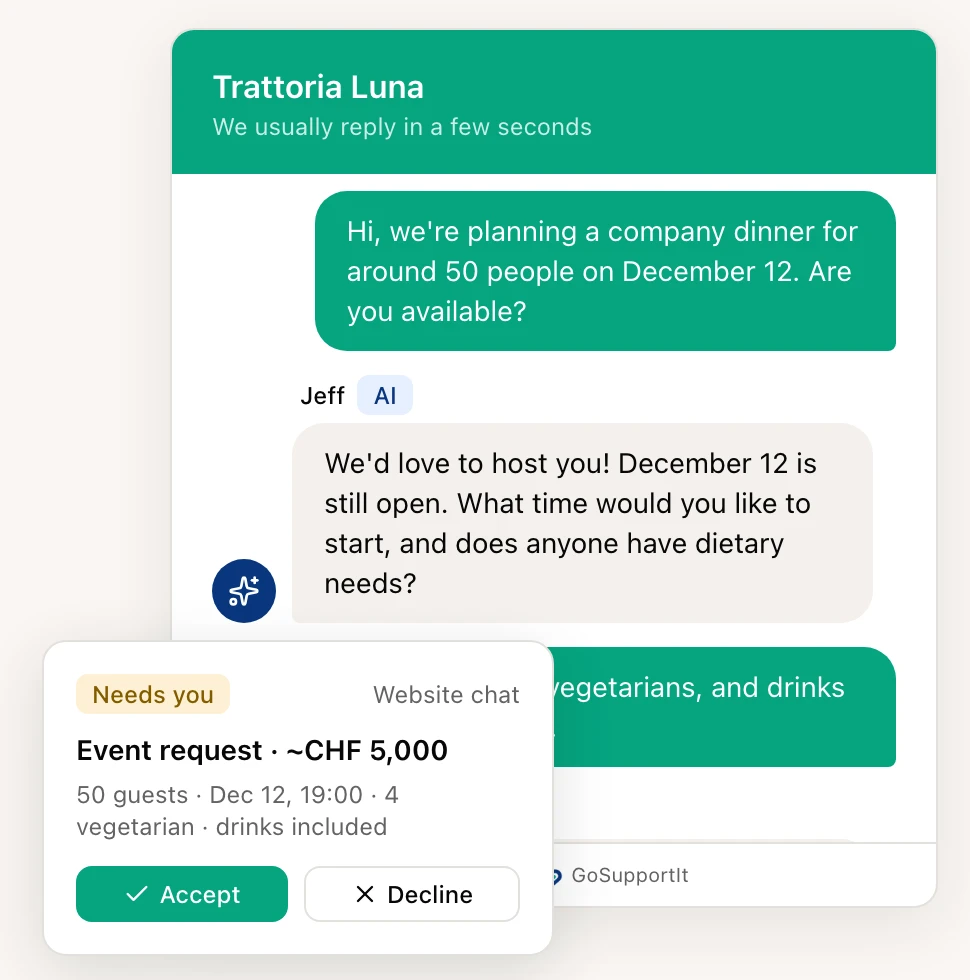
Not every chat message is a question with a ready answer. "Do you have room for 50 people on 12 December?" needs a decision from you. The AI cannot make it, but it can prepare everything.
For that you define request types: question, support ticket, booking request, quote request or your own. Each type has the details you need to reply. The AI asks for them one at a time, one question per message, like a person in a chat, and skips whatever the customer has already said. Name and contact come last: first what it is about, then who is asking.
The request then reaches you in a state where you can accept it, decline it or reply straight away, without having to ask back.
If you do not want to pick up chats yourself
Some businesses do not want a chat that a person has to continue. For them there is a second route: instead of handing over, the AI shows your contact options as buttons, WhatsApp, phone or email, and closes the request without notifying you.
Two cases still go to you: a request where the customer has already given every detail for a callback, and one that needs a decision, such as a booking. That keeps the chat for the questions it can answer, and nobody waits for a reply that never comes.
Installing it is the small part
The chat is one script tag. It runs on WordPress, Shopify, Wix, Webflow, Squarespace and any other site you can add HTML to. Colour and position are set once, greeting and starter questions per language, and your team sees for every message which page it came from.
Optionally the chat recognises returning visitors. It sets a cookie on your website for that, which is why the feature can be switched off, and we discuss in the setup whether you want it. The real work is not in installing it anyway, it is in the knowledge and the tone, and that is where we start.
How many enquiries do you get a month?
Tell us what comes in and through which channels. We tell you what the AI can take on and what stays with you.

This runs on GoSupportIt
GoSupportIt is a product of Digital Vibes GmbH, which is us. The chat on this website runs on it too. We set it up for you and tune it.
- Website chat, contact form, Gmail and API in one inbox
- Per channel: AI off, suggest or autopilot
- Whatever needs a decision lands with you, details included
The chat is as good as the site it runs on
The AI reads your website to answer questions. If there is little on it, or it is out of date, the chat is where that shows first. We set up the chat and, if you want, build the site behind it too, and if enquiries should keep moving afterwards, the funnel as well.
AI Customer Support
Website chat, contact form and Gmail in one inbox. The AI answers or suggests, you decide. We set it up.
Learn moreWebsite & SEO
Website, SEO, hosting and ongoing care in one place. Built so your web presence gets found and brings enquiries.
Learn moreSales Funnel & CRM
Collect leads from ads and your website, manage them in one place and follow up automatically. We can run the funnel for you too.
Learn moreCommon questions
That is your call, and we recommend it. An "AI" label can be shown next to the AI's name, and we switch it on in the setup. Visitors take it better when they know, and nobody feels misled when a person takes over later.
Yes, that can happen with any AI, and anyone who says otherwise is selling you something. That is why there are fixed rules that always take priority, and why you can run any channel in suggest mode only. After launch we go through with you where the AI got it wrong and add to the knowledge.
If you can add HTML there, yes. That works on WordPress, Shopify, Wix, Webflow, Squarespace, Framer and most others. We show you where exactly it goes in your builder, or we add it ourselves.

Ready to become more visible online?
Tell us where you are now. We will show you which mix of social media, website, SEO, content and automations makes sense.