

Answer customer emails automatically without giving up control
The AI reads every customer email, writes a reply in your business's tone and puts it in front of you as a suggestion. You send, edit or take over. Once you trust it, it can reply on its own too.
What you get
- Gmail or Google Workspace connected
- Newsletters, spam and out-of-office replies stay out
- A reply suggestion for every customer email
- Replies leave from the address the customer wrote to
- Autopilot only once you switch it on
- Mailboxes
- Gmail and Google Workspace
- Outlook
- Planned, not yet available
- Starts in
- Suggest mode: you send
- Access
- Read and send, never delete
First separate what needs a reply
A business mailbox is, to a large extent, not customer service. Invoices, notifications from tools, newsletters, out-of-office replies, spam. In between are the emails a customer is waiting on, and those are exactly the ones that get lost.
Before the AI answers anything, it sorts. Newsletters, automatic replies, spam and the Promotions, Social and Updates tabs stay out, as do emails from no-reply addresses. Only mail someone actually wrote to you comes into the inbox. When a reply arrives in a thread, the quoted old text is cut, so you read only what the customer wrote now.
Why email starts in suggest mode
An email is more binding than a chat message. It gets forwarded, printed, dug out again a year later. That is why Gmail in GoSupportIt deliberately starts in suggest mode: the AI writes the reply as a proper email, with a greeting, short paragraphs and a sign-off, and a person sends it.
After a few weeks you know where its suggestions are right and where you change something every time. Where you edit often, we add to the knowledge. Once the suggestions fit throughout, you can put the channel on autopilot, or stay with suggestions. You decide that, not the software.
The reply comes from your address
Customers notice quickly when a reply comes from a strange address. In GoSupportIt every reply goes out from exactly the mailbox the customer wrote to, in the same thread. Whoever wrote to info@ gets the answer from info@.
In a person's name
Per address you can have the AI sign with a name, such as "Anna" for anna@, instead of with the AI's name.
Instructions per address
Accounts writes differently from sales. Instructions per mailbox take priority over the general ones.
Reply with a delay
If you want, the AI waits a few minutes on autopilot before replying, five to ten by default. If a second email arrives in that time, it answers both together.
What the Gmail connection may and may not do
The connection is made through Google sign-in, not your password. GoSupportIt gets the right to read, label and send mail. It cannot delete, not even by accident. The access is stored encrypted, and you can revoke it in your Google account at any time.
Every address is connected on its own. So you can start with info@ and leave the personal mailboxes out until you see how it goes.
How many enquiries do you get a month?
Tell us what comes in and through which channels. We tell you what the AI can take on and what stays with you.

This runs on GoSupportIt
GoSupportIt is a product of Digital Vibes GmbH, which is us. The chat on this website runs on it too. We set it up for you and tune it.
- Website chat, contact form, Gmail and API in one inbox
- Per channel: AI off, suggest or autopilot
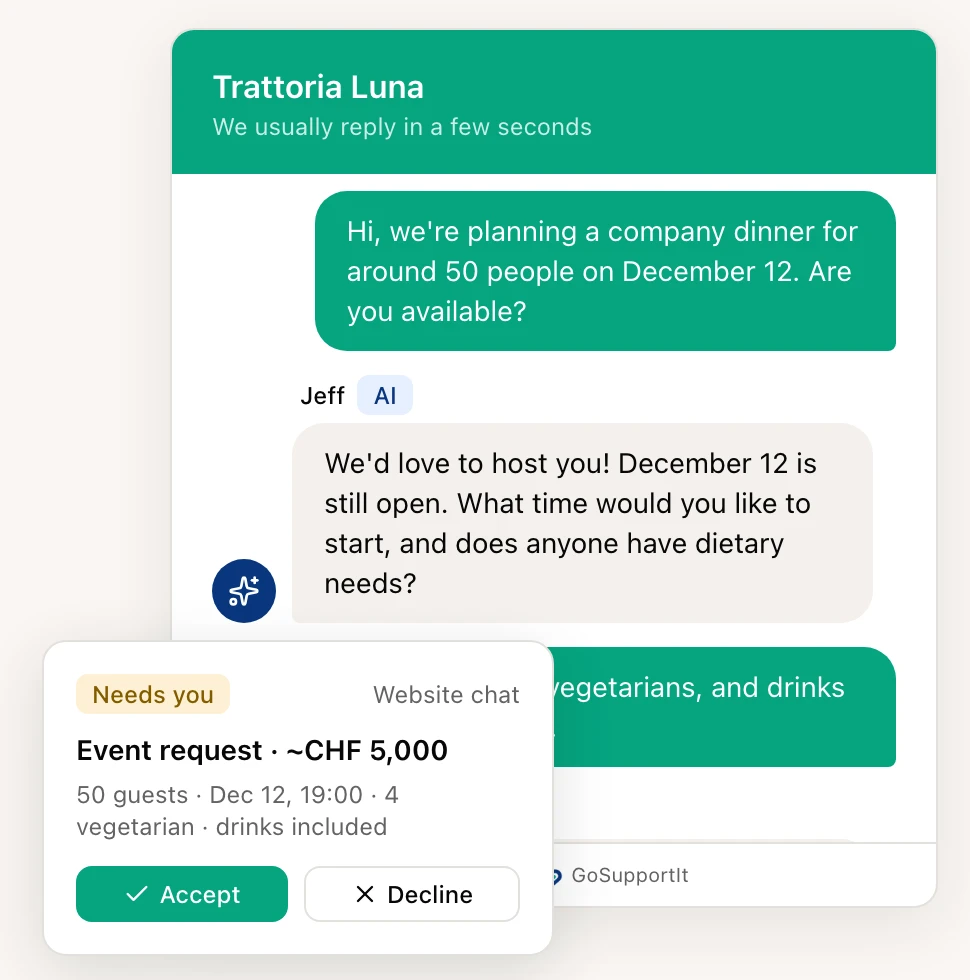
- Whatever needs a decision lands with you, details included
When the email is only the start
An answered enquiry is not yet an order. We set up the email side, and if enquiries should turn into a pipeline with follow-ups, we build that too. Customers who would rather write on WhatsApp than by email get a channel of their own there.
AI Customer Support
Website chat, contact form and Gmail in one inbox. The AI answers or suggests, you decide. We set it up.
Learn moreSales Funnel & CRM
Collect leads from ads and your website, manage them in one place and follow up automatically. We can run the funnel for you too.
Learn moreWhatsApp Marketing
WhatsApp marketing, newsletters and CRM automations as a direct extension of your website, leads and campaigns.
Learn moreCommon questions
Not yet. Outlook is planned in GoSupportIt but not available, and we do not promise a date. What you can do until then: the website chat and contact form run independently of the mailbox, and replies to forms still go to the customer by email.
No. Only emails a person wrote to you become requests. Invoices, newsletters, notifications and automatic replies stay in Gmail and are never answered.
Yes. The emails stay in your mailbox, GoSupportIt only reads along and deletes nothing. Replies sent from GoSupportIt appear in your sent mail as usual.

Ready to become more visible online?
Tell us where you are now. We will show you which mix of social media, website, SEO, content and automations makes sense.